- Платформа игры
- Gothic2 Addon
-> translate.google.com
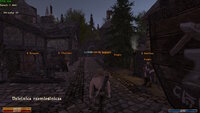
Gothic2 Night Raven NK; Union; shows quest givers NPC names on screen.
Renders names of npcs with support for any language, in radius around the player, without dependency on whether that npc is currently spawned or not. (radius can be configured)
Colors those names based on hard set rules. (see colors)
should work for any mod based on Gothic2 Night Raven; tested on Chronicles of Myrtana and New Balance.
font size is equal to chosen font, FONT_DEFAULT.TGA seems to be the smallest.
RunConditions (default 1)
When enabled, the plugin asks the game whether each NPC's open dialogue options are currently available, using the same condition check the dialogue menu uses. This is what keeps false positives low.


Gothic2 Night Raven NK; Union; shows quest givers NPC names on screen.
Renders names of npcs with support for any language, in radius around the player, without dependency on whether that npc is currently spawned or not. (radius can be configured)
Colors those names based on hard set rules. (see colors)
should work for any mod based on Gothic2 Night Raven; tested on Chronicles of Myrtana and New Balance.
drop the NPCnames.dll into:
Gothic2/system/Autorun
if Autorun folder does not exist, install Union.
or place .vdf in:
Gothic2\Data\Plugins
Requires Union 1.0m
Gothic2/system/Autorun
if Autorun folder does not exist, install Union.
or place .vdf in:
Gothic2\Data\Plugins
Requires Union 1.0m
// SETTINGS ([NpcNames] section) // StartMode=0 0 = quest/trader/important, 1 = quest/trader, 2 = off // Radius=1500 cm // RunConditions=1 0 = never run script conditions (less accurate, will not distinguish quest givers but is script-free) // HideInFocus=1 don't draw the NPC the game already shows a name for // MinDistance=0 cm, hide names closer than this (0 = off) // DebugMode=0 0 off, 1 write NpcNames.log, 2 also draw ALL npcs grey // FontNear=FONT_OLD_10_WHITE.TGA // FontMid=FONT_DEFAULT.TGA // FontFar=FONT_DEFAULT.TGA // Hotkey: LShift + K cycles ALL -> QUEST/merchant -> OFF
Orange = quest giver *in the current moment* MEANING-> talk -> get quest -> name disappears
Light Orange = NPC with which player not talked to yet or dialogue not yet heard
Cyan = NPC who will auto initiate conversation when in close range.
$ Orange = quest giver + merchant
$ Gold = merchant
Grey = LEFTOVER, NPCs who have dialogue, but nothing the mod can sort into quest, talk, trader or important.
Light Orange = NPC with which player not talked to yet or dialogue not yet heard
Cyan = NPC who will auto initiate conversation when in close range.
$ Orange = quest giver + merchant
$ Gold = merchant
Grey = LEFTOVER, NPCs who have dialogue, but nothing the mod can sort into quest, talk, trader or important.
font size is equal to chosen font, FONT_DEFAULT.TGA seems to be the smallest.
RunConditions (default 1)
When enabled, the plugin asks the game whether each NPC's open dialogue options are currently available, using the same condition check the dialogue menu uses. This is what keeps false positives low.
the upgrade from v1 to v2 solves the RunConditions warning.
Warning: it runs script condition functions in the background, for NPCs on screen within Radius. In vanilla Gothic 2 and well-written mods these functions only check things and are harmless.
If a mod's ***dialogue condition*** has side effects (changes variables, gives or creates items, queues NPC actions, spawns NPCs, writes log entries), those effects will repeat while that NPC is visible.
in any normal scenario this should never happen since dialogue conditions only CHECK things and ***functions*** are the ones which actually do things.
If you notice odd behavior near specific NPCs, set RunConditions=0 or remove this plugin.
The likelihood of any issue is extremely low but worth noting.
With RunConditions=0 no script code is ever run by this plugin, but names are shown for every NPC with an unfinished non-permanent dialogue, whether or not it is currently available. Expect many more false positives.
Warning: it runs script condition functions in the background, for NPCs on screen within Radius. In vanilla Gothic 2 and well-written mods these functions only check things and are harmless.
If a mod's ***dialogue condition*** has side effects (changes variables, gives or creates items, queues NPC actions, spawns NPCs, writes log entries), those effects will repeat while that NPC is visible.
in any normal scenario this should never happen since dialogue conditions only CHECK things and ***functions*** are the ones which actually do things.
If you notice odd behavior near specific NPCs, set RunConditions=0 or remove this plugin.
The likelihood of any issue is extremely low but worth noting.
With RunConditions=0 no script code is ever run by this plugin, but names are shown for every NPC with an unfinished non-permanent dialogue, whether or not it is currently available. Expect many more false positives.